
Download mStocks – Free Finance Tool for Mac Users
Overview
mStocks is a completely free finance program designed exclusively for macOS. Developed by Paul Ameden, the application targets investors, day‑traders, and anyone who wants to keep a close eye on stock market movements without paying for a subscription. The software is built in English and belongs to the Finance category, making it a handy companion for personal portfolio tracking, real‑time quote monitoring, and quick technical analysis.
While many finance apps on the market charge monthly fees or limit data access behind a paywall, mStocks offers a no‑cost, ad‑free experience that still delivers essential market data, customizable watchlists, and basic charting tools. Its lightweight design ensures that it runs smoothly on older Mac hardware, and the intuitive user interface lets beginners start tracking their favorite symbols within minutes. Because the program is open to all Mac users, it provides a valuable entry point for those who are new to market analysis or who simply need a reliable, free tool for day‑to‑day stock observation.
Key Features of mStocks
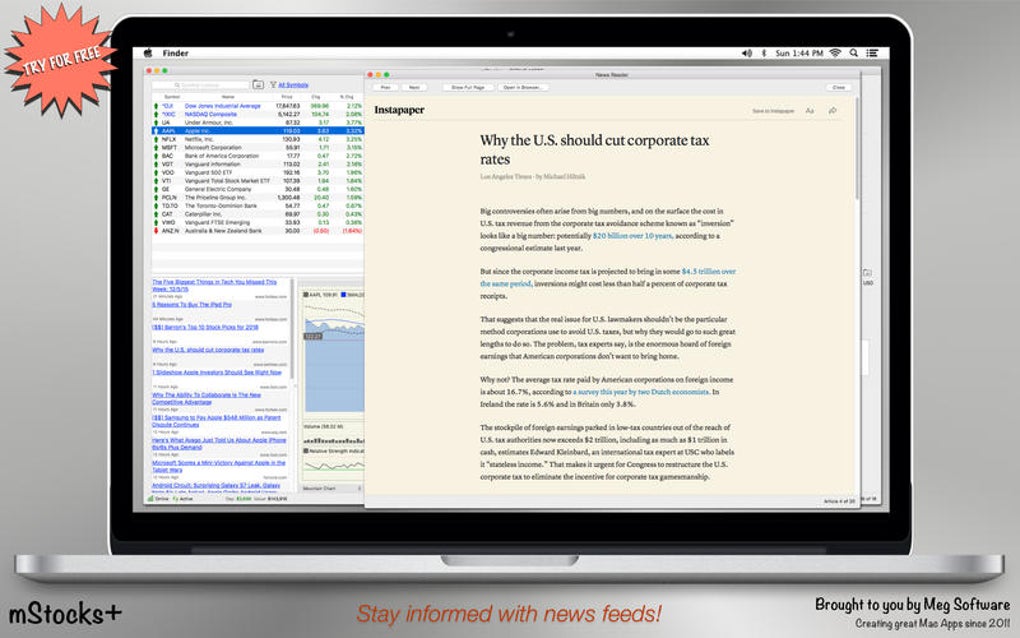
- Real‑time Quote Streaming: Receive live price updates for equities listed on major exchanges such as NYSE, NASDAQ, and AMEX.
- Customizable Watchlists: Create unlimited watchlists, group symbols by sector, or organize them by personal investment strategy.
- Basic Charting Engine: View intraday, daily, weekly, and monthly price charts with simple moving averages and volume overlays.
- Portfolio Tracker: Log purchases, sales, and dividends to keep an up‑to‑date view of gains, losses, and overall performance.
- Alert System: Set price‑point or percentage‑change alerts that trigger native macOS notifications.
- Data Export: Export watchlist or portfolio data to CSV for further analysis in spreadsheet software.
- Lightweight & Secure: No hidden trackers, no advertisements, and a small footprint that runs efficiently on macOS 10.13 and newer.
- Free Updates: Automatic updates keep the app current with the latest market data formats and macOS security standards.
Installation, Setup, and Compatibility
Getting started with mStocks is intentionally straightforward. The download package is available as a signed .dmg file from the developer’s website. Follow these steps to install the app securely:
- Download the Installer: Click the “Download mStocks” button on the official page. The file is scanned by Apple Gatekeeper, ensuring it is free from malware.
- Open the .dmg: Double‑click the downloaded image, then drag the mStocks icon into your Applications folder.
- Launch the App: Navigate to Applications → mStocks and open it. The first launch may prompt you to confirm that you trust the developer; click “Open” to proceed.
- Initial Configuration: Upon first run, you’ll be asked to grant permission for notifications and access to your network. Accept these prompts to enable real‑time data streaming and alert functionality.
- Set Up Watchlists: Use the “+” button in the watchlist pane to add ticker symbols. You can import a list of symbols via a CSV file if you already have a pre‑defined set.
Compatibility: mStocks runs on macOS 10.13 (High Sierra) and later, including macOS Monterey, Ventura, and the upcoming macOS Sonoma. The application is optimized for both Intel‑based Macs and Apple Silicon (M1/M2) devices, automatically using native code paths for best performance. Users with older hardware will still experience smooth operation because the UI is built with lightweight Cocoa components and avoids heavy graphical libraries.
Because the program does not rely on external plugins, you won’t need to install additional runtimes or frameworks. All required libraries are bundled within the .app package, guaranteeing a clean installation that won’t interfere with other finance tools you might already have.
Pros and Cons
Pros
- Completely free with no hidden subscription fees.
- Native macOS design offers fast performance and seamless integration with system notifications.
- Real‑time data streaming for major US exchanges.
- Simple, intuitive interface that works for beginners and casual investors.
- Supports both Intel and Apple Silicon Macs.
- Secure, ad‑free experience with regular updates.
Cons
- Lacks advanced technical analysis tools (e.g., Bollinger Bands, Fibonacci retracements).
- No built‑in news feed; users must rely on external sources for market commentary.
- Limited to US exchange data; international markets are not covered.
- Export options are restricted to CSV, which may require additional formatting for some users.
- Absence of cloud sync means watchlists are stored locally only.
Frequently Asked Questions
Is mStocks really free or are there hidden costs?
mStocks is 100 % free. The developer, Paul Ameden, does not charge for any features, and there are no in‑app purchases or subscription tiers. All updates are provided at no cost.
What kind of market data does mStocks provide?
The application streams live quotes for stocks listed on the NYSE, NASDAQ, and AMEX. It does not currently support forex, commodities, or non‑US exchanges.
Can I set price alerts on my Mac?
Yes. mStocks includes a built‑in alert system that triggers native macOS notifications when a stock reaches a specified price or percentage change.
Does mStocks work on Apple Silicon Macs?
Absolutely. The binary includes both Intel and Apple Silicon slices, so it runs natively on M1, M2, and later chips without Rosetta translation.
How do I back up my watchlists and portfolio data?
All data is stored locally in the ~/Library/Application Support/mStocks folder. You can manually copy the folder to an external drive or use Time Machine for automated backups. The app also offers CSV export for easy import into other tools.
Conclusion & Next Steps
mStocks delivers a solid, no‑cost solution for macOS users who need real‑time stock quotes, basic charting, and simple portfolio tracking. While power traders may miss the depth of professional platforms, the app’s lightweight design, native macOS integration, and ad‑free experience make it a compelling choice for hobbyists, students, and anyone looking to keep a pulse on the market without breaking the bank. If you value a secure, fast, and straightforward finance tool, downloading mStocks today is a sensible first step. Click the button below to start the free download, install the app, and begin building your watchlists in minutes.
mStocks offers a surprisingly rich feature set for a free macOS finance app. Its real‑time streaming, customizable watchlists, and clean native UI give it an edge over many paid alternatives that feel cluttered. The lack of advanced analytics and international market coverage keeps the app lightweight, but power users may need to supplement it with specialized tools. Overall, for anyone needing a reliable, secure, and free stock tracker on a Mac, mStocks earns a solid 4.5‑star rating.







